 November 18, 2026
Logistics App Development: Types, Features, Cost and Steps
12
Nov
2026
 Infigo Solutions Team
 Software Development
 0 Comments
Logistics app development is the process of designing and building mobile and web apps that move goods, vehicles and information on time: driver apps, dispatch dashboards, shipment tracking, proof of delivery and warehouse tools. Most projects are a connected system for several roles, not one app, and a focused first release can often go live in 6 to 10 weeks.
This guide explains the main types of logistics apps, the features each user role needs, what logistics app development costs, how long it takes and the integrations to plan early. It draws on the transportation projects we have delivered for towing and moving companies in Canada.
What Is Logistics App Development?
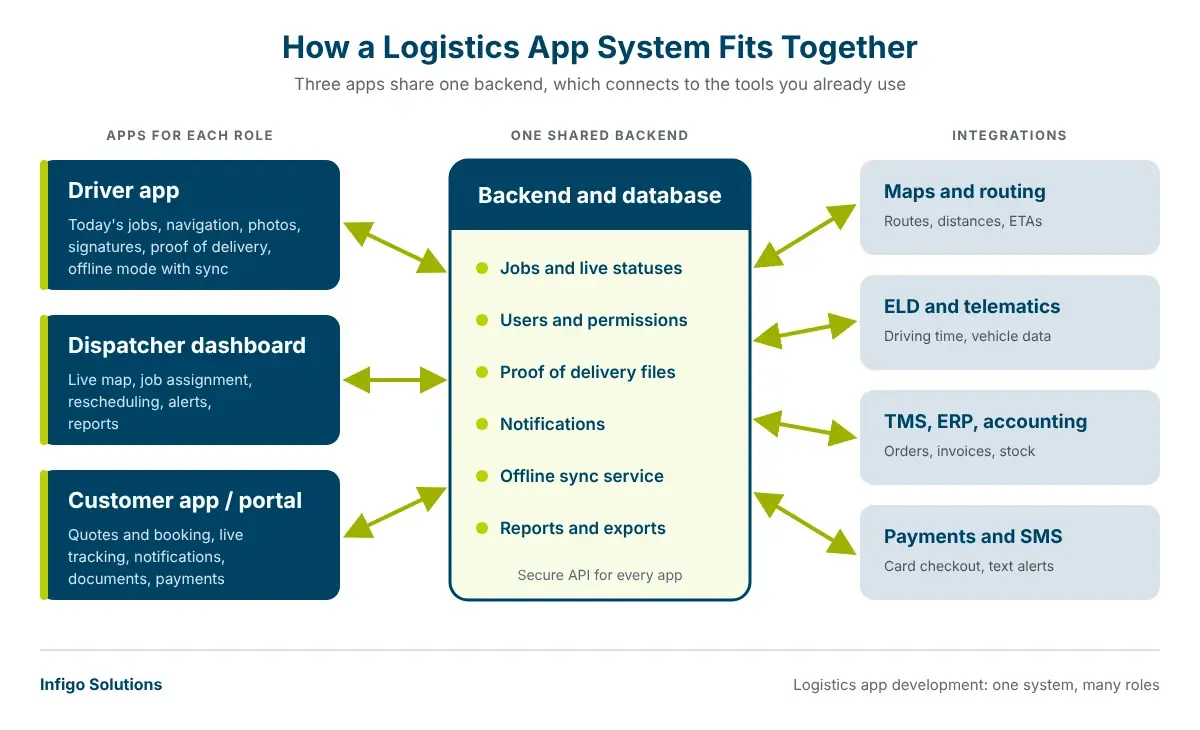
Logistics app development covers the planning, design, build, testing and support of software that runs transport and delivery work. A typical system has a mobile app for drivers or warehouse staff, a web dashboard for dispatchers and managers, and often a customer app or portal for booking and tracking. All of them share one backend, so everyone sees the same jobs, statuses and documents.
That is why logistics app development is closer to building a small platform than a single app. The value comes from the connections: a job created in the dashboard appears on the driver's phone, the driver's photo and signature update the customer, and the invoice is ready when the job closes.
Types of Logistics Apps
Before any logistics app development starts, decide which part of your operation the app must fix first. These are the most common types:
| App type | Main users | Core features |
|---|---|---|
| Driver and delivery app | Drivers, couriers, movers | Job list, navigation, status updates, photos, signatures, proof of delivery |
| Dispatch and fleet dashboard | Dispatchers, fleet managers | Job assignment, live map, driver schedules, vehicle availability, alerts |
| Customer booking and tracking app | Shippers, households, businesses | Quotes, booking, live status, notifications, payments, delivery history |
| Warehouse and inventory app | Warehouse staff | Receiving, barcode scanning, picking, stock counts, transfers |
| On-demand service app | Towing, moving and courier customers | Request a service, share location, accept quote, track the truck, pay |
| Management and reporting portal | Owners, operations, finance | On-time rate, jobs per vehicle, cost per job, invoices, exports |
Most companies start with two of these, usually a driver app and a dispatch dashboard, then add a customer app once the core workflow is stable. For last-mile delivery businesses, the driver app and customer tracking usually come first.
Must-Have Features for Each User Role
Good logistics app development starts from the people who will use the app every day. Each role needs a different screen and a different level of detail.
Driver app
In logistics app development, the driver app gets the most use and the least patience, so every extra tap costs time on the road.
- Today's jobs in order: pickup and drop-off details, contact buttons and notes in one screen.
- Offline mode: drivers lose signal in basements, rural roads and loading docks, so the app saves updates and syncs later.
- Proof of delivery: photos, signatures, barcode scans and timestamps attached to the job.
- Simple status buttons: large controls a driver can use quickly and safely when parked.
- Location sharing: only when the job needs it, with clear permission prompts.
Dispatcher dashboard
- Real-time tracking and job board: every vehicle, job and status on one live map.
- Assignment and rescheduling: drag a job to another driver and notify them instantly.
- Alerts: late arrivals, failed deliveries and jobs with missing documents.
Customer app or portal
- Quotes and booking: online requests with the details your team needs to price the job.
- Tracking and notifications: live status by text, email or push, so customers stop calling to ask where the truck is.
- Documents and payments: receipts, delivery photos and invoices in one place.
Admin and reporting
- Users and permissions: each role sees only what it needs.
- Reports: on-time delivery, jobs per driver, revenue per job and exports for accounting.
How Much Does Logistics App Development Cost?
Logistics app development cost depends on the number of user roles, the platforms (iOS, Android, web), the integrations and how much of your workflow the first release covers. There is no honest single price, but real project data helps. Our Clutch-reviewed website and mobile app for a towing company was in the $10,000 to $49,999 range, our custom software project for a moving and relocation company was in the $50,000 to $199,999 range, and most of our Clutch-reviewed projects fall between $10,000 and $49,999.
| Cost driver | Keeps cost lower | Pushes cost higher |
|---|---|---|
| User roles | Driver app plus one dashboard | Drivers, dispatch, customers, warehouse and partners |
| Platforms | One cross-platform mobile app plus web | Separate native iOS and Android apps |
| Integrations | Maps and email or SMS notifications | TMS, ERP, telematics, ELD, accounting and carrier APIs |
| Offline and sync | Read-only offline job list | Full offline editing with conflict handling |
| Automation and AI | Rules-based alerts | Route suggestions, document reading, demand forecasting |
| Rollout | One depot or city first | Many locations, languages and user types at once |
Plan for running costs too: hosting, map and SMS usage fees, app store accounts and ongoing maintenance. Our web application development cost guide breaks down maintenance and hosting in more detail, and the AI app development cost guide covers what AI features add.
How Long Does Logistics App Development Take?
A focused first release, such as a driver app with a dispatch dashboard for one workflow, can often go live in 6 to 10 weeks. Larger systems with customer apps, warehouse modules, several integrations or many locations take longer and are delivered in phases. The fastest logistics app development projects agree on one workflow, one region and one success measure before design starts.
The Logistics App Development Process in 7 Steps
- Discovery: map how a job moves today, from booking to invoice, and list the delays and manual steps you want to remove.
- Roles and scope: decide which roles and features belong in the first release. Our MVP development steps explain how to keep this scope small and testable.
- UX for the field: design for gloves, sunlight, one hand and weak signal. The UX design process we follow starts with real user tasks, which matters even more for drivers.
- Architecture: plan the backend, data model, offline sync and integrations so the system can grow. See how we think about web application architecture for the dashboard side.
- Build and test in short cycles: ship working screens early, then test on real devices, real routes and real network conditions.
- Pilot and rollout: start with a few drivers or one depot, fix what they find, then train the wider team.
- Support and improve: watch usage data, fix issues fast and add features in planned releases.

Integrations and Compliance to Plan Early
Integrations decide much of the cost and risk in logistics app development, so list them during discovery, not after launch.
- Maps and routing: services such as the Google Routes API return routes and route matrices between many origins and destinations. Map and routing services are usually priced by usage, so include them in your running costs.
- ELD and hours of service: in the US, the FMCSA electronic logging device (ELD) rule is a congressional mandate under MAP-21 that sets how covered commercial drivers record driving time. An ELD connects to the vehicle's engine to record driving time automatically, so a driver app usually integrates with your ELD provider rather than replacing it.
- Background location: on Android, apps that target Android 10 or higher need the ACCESS_BACKGROUND_LOCATION permission for all-the-time location, and should only ask for the access a feature really needs. Plan permission screens and privacy text early.
- Business systems: TMS, WMS, ERP, accounting, payment gateways and carrier APIs. Check each system's API before you promise a feature.
Common Mistakes in Logistics App Development
- Building every role at once: launching driver, dispatch, customer and warehouse apps together delays everything. Start with the role that removes the most manual work.
- Ignoring offline use: a driver app that freezes without signal will be abandoned in the first week.
- Skipping a field pilot: office testing misses glare, gloves, poor signal and real delivery timing. Test with a few drivers on real routes before rollout.
- Underestimating integrations: TMS, accounting and telematics connections often take longer than the screens. Confirm API access before you fix the timeline.
- Forgetting running costs: maps, SMS, hosting and maintenance continue after launch, so budget for them from day one of logistics app development.
Custom Logistics App or Off-the-Shelf Software?
Off-the-shelf tools are quick to start and fine for standard workflows. Custom logistics app development makes sense when your process is your advantage, when several tools need to work as one, or when per-user fees grow faster than your fleet. Many companies keep a packaged system and build a custom driver or customer app around it. Our page on logistics software development compares both options in a table.
Real Example: A Towing Company's Website and Mobile App
Global Towing, a towing and roadside assistance company in Canada, needed an easier way for customers to request services across web and mobile. Infigo Solutions designed and built a responsive website and a mobile app with customer inquiry management, backend integration and an admin dashboard, with a team of 2 to 5 specialists. According to the client, the project improved their online presence and led to more customer inquiries and smoother service request management. This project shows a pattern we see in most logistics app development work: the app succeeds when it makes one everyday task easier for the customer and the team at the same time. Read the full towing app case study.

Can AI Help in a Logistics App?
Yes, once your job and location data is clean. AI is now a common request in logistics app development, but it only pays off on top of a working core system. Useful AI features include reading bills of lading and invoices, suggesting the next best driver for a job, predicting late deliveries and answering customer status questions automatically. Start with one repetitive task that costs your team time every day; our guide to process automation explains how to pick it.
Logistics App Development FAQs
How much does it cost to build a logistics app?
It depends on the user roles, platforms, integrations and offline needs. As real data points, our Clutch-reviewed towing website and mobile app project was in the $10,000 to $49,999 range and our moving company software project was in the $50,000 to $199,999 range. A clear estimate needs a short discovery of your workflow first.
How long does logistics app development take?
A focused first release, such as a driver app with a dispatch dashboard, can often go live in 6 to 10 weeks. Systems with customer apps, warehouse modules or many integrations take longer and are released in phases, so your team can use the first version while the next features are built.
Should a logistics app be native or cross-platform?
For logistics mobile app development, cross-platform frameworks such as React Native or Flutter suit most driver and customer apps, because one codebase serves iOS and Android and keeps cost lower. Native apps make sense when you need heavy background tracking, special hardware such as rugged scanners, or very high performance on one platform.
Can a driver app work without internet?
Yes, if offline mode is designed from the start. The app stores the day's jobs on the phone, lets drivers record statuses, photos and signatures without signal, and syncs everything when the connection returns. Decide early how the system handles two people editing the same job while offline.
Do I need ELD integration in my logistics app?
Only if your drivers are covered by hours-of-service rules and you want driving time inside your own app. Certified ELDs connect to the vehicle's engine, so most custom apps read data from your ELD provider's API rather than replacing the device. Check which provider your fleet uses before you plan this feature.
How do I choose a logistics app development company?
Look for real transportation projects, verified client reviews, experience with your integrations and a clear plan for offline use, testing on real routes and support after launch. Infigo Solutions is rated 5.0 on Clutch from 41 reviews, including towing and moving clients. Ask every partner who owns the code; with us, it is set in your contract.
Planning a driver app, dispatch dashboard or customer tracking app? Our team builds custom mobile app development projects for transportation businesses in the US and Canada. Tell us about your operation and we will reply within 24 hours.


.webp "Share on LinkedIn")
Leave a Message

Infigo Solutions Team
Software Development Team
Infigo Solutions is a software development company founded in 2020. We build MVPs, AI products, web and mobile apps and custom business software for startups and growing companies in the US and Canada, and we are rated 5.0 on Clutch from 41 client reviews.
Recent Posts
 November 18, 2026
 November 16, 2026
Private LLM: How to Deploy an On-Premise LLM for Business
November 12, 2026
Comments
No comments yet. Be the first to comment!