 October 26, 2026
Web Application Architecture: Components, Types and Diagram

26
Oct
 Max
Max Software Development
 0 Comments
Published
Web application architecture is the plan for how the parts of a web app work together: the frontend users see in the browser, the backend that runs business logic, the database that stores data and the APIs and services that connect them. Good web application architecture keeps the app fast, secure and easy to change as users and features grow.
Every web app has an architecture, whether someone planned it or not. When it is planned, adding features stays predictable and the app handles growth without a rewrite. When it is not, small changes break other parts, pages slow down as data grows and every release feels risky. This guide explains the components, the main types, a simple diagram and the decisions that matter most when you plan a new product.
How Web Application Architecture Works
The easiest way to understand web application architecture is to follow one request. A user opens your app and clicks "View my orders":
- The browser loads the frontend, usually from a content delivery network (CDN) close to the user.
- The frontend sends a request to the backend through an API.
- A load balancer passes the request to one of several application servers.
- The backend checks who the user is, applies the business rules and asks the database for that user's orders.
- Frequently used data may come from a cache instead of the database, which makes the reply faster.
- The backend sends the result back as data, and the frontend shows it on screen.
This whole round trip usually takes less than a second. Each step is a separate part of the web app architecture, and each one can be scaled, secured or replaced on its own.
Core Components of Web Application Architecture
The table below lists the components of web application architecture that appear in almost every modern product, from a small MVP to a large platform.
| Component | What it does | Common examples |
| Frontend (client) | Screens and interactions in the browser | React, Next.js, Vue, Angular |
| Backend (server) | Business logic, rules and processing | Node.js, Python, .NET, Java, PHP |
| Database | Stores and returns data | PostgreSQL, MySQL, MongoDB |
| APIs | Let the frontend, backend and other systems talk | REST, GraphQL |
| Authentication | Logins, roles and permissions | OAuth 2.0, single sign-on |
| Cache | Keeps frequent data in memory for speed | Redis |
| CDN | Serves files from servers close to users | Cloudflare, Amazon CloudFront |
| Load balancer | Spreads traffic across servers | Nginx, cloud load balancers |
| Background jobs and queues | Run slow tasks such as emails and reports | RabbitMQ, Amazon SQS |
| Monitoring and logs | Show errors, speed and usage | Application monitoring and log tools |
You do not need all of these on day one. A first release often runs on a frontend, one backend, one database and simple authentication. The others are added when real traffic or real problems call for them.
Layers of a Web Application: The Three-Tier Model
Most teams describe web application architecture in three layers, often called the three-tier model:
- Presentation layer: what the user sees and clicks, running in the browser.
- Business logic layer: the rules of your product, such as pricing, permissions and workflows, running on the server.
- Data layer: the database and file storage where information lives.
Keeping these layers separate is the most useful habit in web application architecture. It lets you redesign the screens without touching the rules, or move the database without rewriting the frontend. Microsoft's guide to architecture styles calls this the N-tier style and explains when it fits best.
Types of Web Application Architecture
There is no single best design. The right type of web application architecture depends on your team size, your traffic and how fast the product is changing.
| Type | How it works | Best for | Main trade-off |
| Monolith | One codebase and one deployment for the whole backend | MVPs, small teams, new products | Harder to scale parts separately as it grows |
| Modular monolith | One deployment, but clear internal modules with strict boundaries | Growing products that want order without extra servers | Needs discipline to keep modules separate |
| Microservices | Many small services, each deployed on its own | Large products with several teams | More infrastructure, monitoring and cost |
| Serverless | Functions run on demand in the cloud | Uneven traffic, event-driven tasks | Cold starts, vendor lock-in, harder local testing |
| Single-page app plus API | A JavaScript frontend talks to a separate API | Dashboards, portals, SaaS products | Needs extra work for SEO on public pages |
For most new products, a well-structured monolith or modular monolith is the safest starting point. Martin Fowler and James Lewis, in their well-known article on microservices, note that many teams do better starting with a monolith and splitting it only when it causes real problems. Moving to microservices too early adds servers, deployments and monitoring before you have the users to justify them.

A Simple Web Application Architecture Diagram
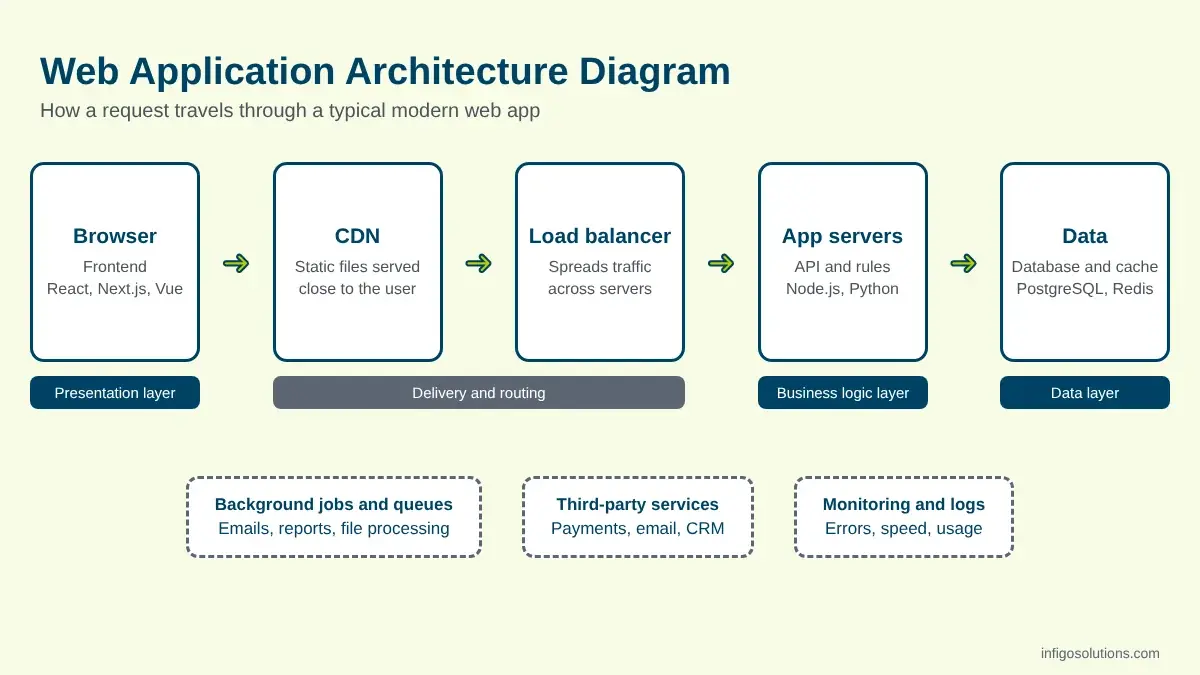
A web application architecture diagram does not need special software. A clear version for most products shows five boxes from left to right:
User's browser → CDN (static files) → Load balancer → Application servers (API and business logic) → Database and cache
Add a side box for background jobs and another for third-party services such as payments, email or a CRM. Draw arrows only where data actually flows. This one picture helps founders, developers and investors talk about the same system, and it is usually the first thing a new developer asks for.
How to Design Web Application Architecture: 6 Decisions
When you plan a new product, these six decisions shape your web application architecture more than any framework choice.
- Start from the users and data. List the main user roles, what each one does and what data the app stores. The architecture should follow these needs, not a trend.
- Choose the architecture type. For a first release, a modular monolith is usually enough. Plan clear module boundaries so parts can be split later if needed.
- Pick a stack your team can support. A familiar, well-supported stack beats a fashionable one. Hiring and maintenance matter as much as speed.
- Plan security from day one. Decide how users log in, what each role can see and how data is protected. Secure web application architecture is much cheaper to build in than to add later.
- Design for growth, but build for today. Use stateless servers, a cache and background jobs where they solve real problems. Avoid paying for scale you do not have yet.
- Plan deployment and monitoring. Automated deployments, backups and error tracking turn a working app into a reliable one. Our cloud migration and DevOps services cover this part in detail.
The AWS Well-Architected Framework is a useful checklist here. It reviews a design against six pillars: operational excellence, security, reliability, performance efficiency, cost optimization and sustainability.

Modern Web App Architecture Best Practices
Whatever type you choose, these practices keep a modern web app architecture healthy:
- Keep servers stateless, so you can add or remove servers without losing user sessions.
- Put an API between the frontend and the data, so mobile apps and partners can use the same backend later.
- Cache what is read often, such as product lists or settings.
- Move slow work to background jobs, such as sending emails, generating reports or processing files.
- Use managed cloud services for the database, storage and queues when your team is small.
- Log, monitor and alert on errors and slow requests before users report them.
- Write down the architecture, including the diagram and the reasons behind each decision.
Web Application Architecture for MVPs vs Growing Products
The right web application architecture changes as the product matures. An MVP needs to reach real users quickly, so the goal is a simple, clean design that can grow. A focused first release often takes 6 to 10 weeks, and over-engineering is one of the most common reasons that timeline slips.
As the product grows, the team usually adds caching, background jobs, read replicas for the database and better monitoring. Splitting into services comes later, and only for the parts that need it. If you are rebuilding an older system rather than starting fresh, our guide to enterprise application modernization explains how to move step by step without major downtime.
Architecture also drives cost. More services, environments and integrations mean more build and running time, which is why our web application development cost guide treats architecture as one of the main cost factors. If you are still deciding whether you need a web app at all, start with web application vs website.

Common Web Application Architecture Mistakes
- Starting with microservices for a product that has no users yet.
- Mixing business logic into the frontend, which makes rules hard to reuse and easy to bypass.
- One shared database for everything with no clear ownership of tables, which makes later changes risky.
- No plan for roles and permissions until a customer asks for them.
- No staging environment, so every change is tested on real users.
- No documentation, so only one developer understands how the system fits together.
If you are reviewing an existing app before an investment or a handover, our technical due diligence checklist covers how to assess its architecture, code quality and security.
Frequently Asked Questions
What is web application architecture?
Web application architecture is the structure of a web app: how the frontend, backend, database, APIs and supporting services are organized and how they communicate. It decides how fast, secure and scalable the app is, and how easily the team can add features without breaking existing ones.
What are the main components of web application architecture?
The main components are the frontend that runs in the browser, the backend that holds business logic, the database, the APIs that connect them, and authentication. Growing apps add a cache, a CDN, a load balancer, background job queues and monitoring when traffic and features require them.
What is the three-tier web application architecture?
Three-tier architecture splits a web app into a presentation layer (the user interface), a business logic layer (the server-side rules) and a data layer (the database). Each layer can be changed, scaled or replaced with little impact on the others, which is why most web apps follow this model.
Should a new web app use a monolith or microservices?
Most new web apps should start as a well-structured monolith or modular monolith. It is faster to build, cheaper to run and easier to change while the product is still finding its users. Microservices make sense later, when separate teams or parts of the system need to scale and deploy independently.
How do I choose the right web application architecture?
Start from your users, data and expected traffic, not from a trend. Pick an architecture type and a stack your team can maintain, plan security and roles from the start, and add caching, queues or extra services only when real usage needs them. Document every major decision.
Can web application architecture be changed later?
Yes, but the cost depends on how clean the first version is. Apps with clear layers, APIs and module boundaries can evolve step by step, for example by moving one module into its own service. Apps with tangled code and a shared database often need a larger rebuild.
Final Thoughts
Good web application architecture is not about using the newest tools. It is about clear layers, the simplest type that fits your stage and a plan for security, growth and monitoring. Get those right, and your web app can grow from a first release to a mature product without starting over.
If you are planning a new portal, platform or SaaS product, our web application development team can help you design the architecture and scope a first release. For subscription products with multiple customer accounts, see how we approach SaaS development.


.webp "LinkedIn")
Leave a Message

Max
Senior Consultant
Helps enterprises evaluate custom software partners, plan legacy modernization, and budget realistically for large-scale systems.
Recent Posts
 October 26, 2026October 26, 2026
Web Application Architecture: Components, Types and Diagram
 October 26, 2026
Comments
No comments yet. Be the first to comment!