
 October 26, 2026
Process Automation: What Actually Happens When You Stop Doing Repetitive Work By Hand
19
Jun
 Admin
Admin Technology
 0 Comments
Published Updated
It's 9:14 AM on a Tuesday. Sarah, an operations coordinator, opens her inbox to find 47 new client requests that came in overnight. Each one needs to be read, categorized, logged into the CRM, cross-checked against existing records, and routed to the right team. By the time she's done manually processing all of them, it's almost noon, and that's before she's done any actual work that requires her judgment or expertise.
Now picture the same Tuesday, six weeks later, after her team automated this exact workflow. The 47 requests get extracted, classified, validated, and routed automatically the moment they arrive. Sarah opens her inbox at 9:14 AM to find the work already done, with a short summary waiting for her review. She spends the next three hours on the parts of her job that actually need a human brain.
This is what process automation actually looks like in practice. Not a vague promise about "efficiency," but a real, measurable shift in how a workday unfolds.
The Workflow Nobody Talks About Until It Breaks
Every business has at least one process exactly like Sarah's. Data comes in from somewhere, a human has to read it, make a decision about it, enter it somewhere else, and pass it along. It's rule-based, it's repetitive, and it's almost never the reason anyone got hired.
Yet this kind of work quietly eats a massive share of operational hours. Teams accept it because it's "just how things are done," right up until the volume grows past what a human team can reasonably keep up with. That's usually the moment someone finally asks the question that should have been asked years earlier: why is a person doing this at all?
Myth: Automation Is Only for Massive Enterprises With Huge Budgets
This is probably the most persistent misconception about process automation, and it's simply outdated. A decade ago, building automated workflows required custom engineering teams and six-figure budgets. That's no longer the case.
Modern automation tools connect directly to platforms businesses already use, Slack, Microsoft Teams, Google Sheets, Salesforce, HubSpot, without requiring a developer to build custom integrations from scratch. A five-person startup and a five-hundred-person company can both deploy the same kind of trigger-action automation, just scaled to their own workflows.
Reality: The barrier to entry has dropped so significantly that the businesses without any automation are now the outliers, not the other way around.
Myth: Automation Means Replacing People
This fear shows up in almost every conversation about automation, and it's worth addressing directly. Going back to Sarah's example: nobody on her team lost their job when the request-routing workflow got automated. What changed is that her actual role finally matched her actual title.
Process automation targets the specific tasks that are repetitive and rule-based, the kind of work that doesn't require judgment, creativity, or relationship-building. It removes that layer so people can spend their time on the things that genuinely need a human, handling exceptions, building client relationships, solving problems that don't fit a predictable pattern.
Reality: Most teams that automate aggressively end up needing their people more, not less, because their people are finally doing the work that actually matters.
Myth: Automation Is Fragile and Breaks Constantly
There's a lingering perception that automated workflows are brittle, that one unexpected input breaks the whole system. This was a fair criticism of early automation tools, but it doesn't hold up against how modern systems are built.
Today's automation platforms use AI-driven classification and validation steps specifically to handle variability. A document doesn't need to match an exact template to be processed correctly. A request doesn't need to use specific keywords to be routed properly. The system is built to handle the messy, inconsistent reality of actual business data, not just a clean theoretical example.
Reality: Well-built automation handles edge cases more reliably than a tired human doing the same task for the two-hundredth time that week.
How It Actually Works Behind the Scenes
Strip away the marketing language and a process automation system follows a fairly straightforward sequence, even when the underlying technology is sophisticated.
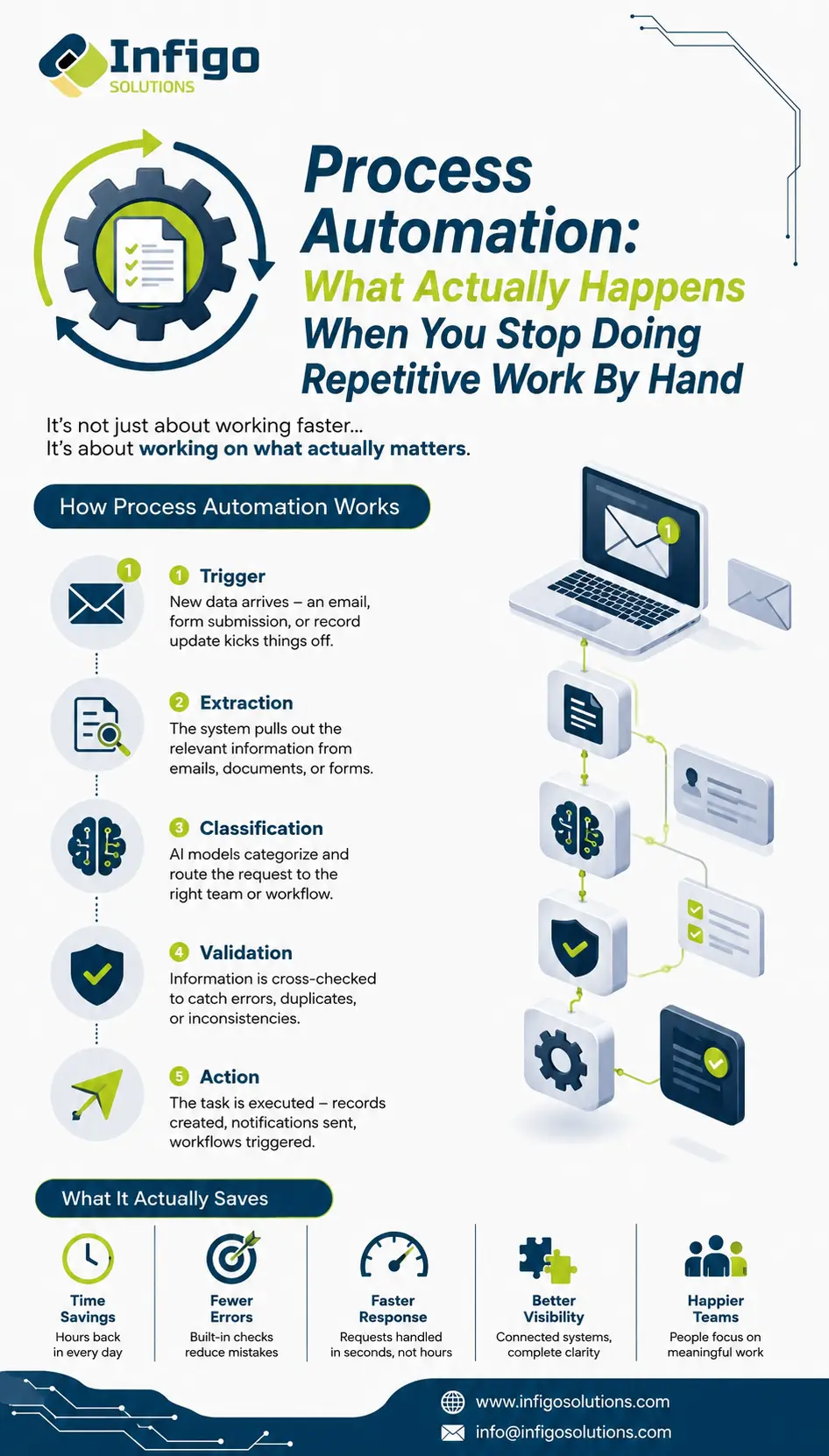
A trigger kicks things off. New data shows up, an email arrives, a form gets submitted, a record updates in a connected system. This is the starting signal that tells the automation something needs to happen.
Extraction pulls out the relevant information. Whether it's a document, an email, or a structured data entry, the system identifies and pulls out the specific pieces of information that matter, customer name, request type, urgency level, relevant account details.
Classification sorts it correctly. AI models trained to recognize patterns determine what kind of request this is and where it needs to go. This is where modern automation outperforms older rule-based systems, since it can handle variation rather than requiring an exact match to a predefined template.
Validation checks the work. Before anything moves forward, the system cross-references the extracted and classified information against existing records to catch errors, duplicates, or inconsistencies that would otherwise require manual review.
Action completes the loop. The task gets executed, a record gets created, a notification gets sent, a workflow gets triggered in another connected tool, and the cycle closes without anyone needing to manually intervene.
The entire sequence, from a new email landing in an inbox to a completed action in a connected system, often takes seconds. The same task, done manually, could easily take fifteen minutes per instance. Multiply that across dozens or hundreds of instances a week, and the time savings stop being a minor convenience and start being a structural advantage.
What This Actually Saves, in Practical Terms
Beyond the obvious time savings, well-implemented process automation tends to deliver a few specific, measurable improvements that show up across most businesses that adopt it.
Error rates drop noticeably, since automated validation steps catch inconsistencies that tired humans doing repetitive work tend to miss. Response times shrink, since automated workflows don't wait for someone to get to their inbox. Cross-system visibility improves, since automation naturally connects tools that previously required manual data transfer between them. And perhaps most importantly, the people doing the work report higher satisfaction, since they're no longer spending their day on tasks that feel beneath their actual skill set.
Frequently Asked Questions
What kinds of processes are good candidates for automation?
Any process that's repetitive, rule-based, and follows a predictable pattern is a strong candidate. Data entry, document processing, request routing, status updates, and cross-system data syncing are some of the most common starting points for businesses new to automation.
Do we need technical expertise on our team to implement this?
Not necessarily. Many modern automation platforms are designed for non-technical users to configure workflows through visual builders. That said, more complex automations involving custom logic or unusual integrations often benefit from working with a partner who has implementation experience.
How long does it typically take to see results after implementing automation?
Most businesses see measurable time savings within the first few weeks, since the automated workflow starts handling tasks immediately upon deployment. The bigger gains, fewer errors, better cross-team visibility, tend to compound over the following months as the system handles more volume.
Can automation handle unpredictable or unusual requests, not just routine ones?
Modern AI-driven automation handles variability far better than older rule-based systems did. While truly unique edge cases still benefit from human judgment, the classification and validation steps are specifically designed to recognize patterns even when the input doesn't perfectly match a template.
Will automating a process mean reducing our team size?
Most businesses find the opposite to be true. Automation removes the repetitive layer of work, which frees up the team to handle higher-value tasks, exceptions, and relationship-driven work that actually requires a person. Many teams end up doing more meaningful work with the same headcount, rather than needing fewer people.
The Real Takeaway
Sarah's Tuesday didn't get shorter because her team worked harder. It got shorter because the part of her job that never needed a human in the first place finally stopped requiring one. That's the entire premise of process automation, not eliminating people from the equation, but eliminating the specific tasks that were never a good use of their time to begin with.
If your team has a workflow that feels exactly like the one described here, data coming in, getting manually sorted, manually entered, manually routed, there's a good chance it's costing more in hours and errors than most people realize until they see it laid out.
The team at Infigo Solutions has helped businesses identify exactly these kinds of workflows and turn them into automated systems that actually hold up under real-world conditions. Reach out at info@infigosolutions.com and let's figure out where your Tuesday could look different.


.webp "LinkedIn")
Leave a Message
Recent Posts
 October 26, 2026
 October 26, 2026
Web Application Architecture: Components, Types and Diagram
 October 26, 2026
Comments
No comments yet. Be the first to comment!