 November 2, 2026
Generative AI Implementation: A 6-Step Plan to Production

2
Nov
2026
 Max
 AI
 0 Comments
Generative AI implementation is the process of taking a generative AI idea from a business problem to a tool your team uses every day. It has six steps: pick one measurable use case, check your data, choose the approach (prompting, RAG or fine-tuning), build and test a proof of concept, add guardrails, then launch small and scale.
Most teams do not struggle with the model. They struggle with everything around it: unclear goals, messy data, missing guardrails and no plan for what happens after the demo. This generative AI implementation guide walks through each step, the decisions you will face, a realistic timeline and the challenges to plan for, so your project reaches production instead of stalling after the pilot.
What Is Generative AI Implementation?
Generative AI implementation is the work of putting a generative AI system, usually built on a large language model (LLM), into a real business process. It covers the use case, data, model approach, integration with your existing software, security, testing, user training and the monitoring that keeps the system useful after launch.
It is different from simply giving employees a chatbot subscription. A real generative AI implementation connects the model to your own data and tools, follows your access rules and is measured against a business outcome, such as hours saved per week, faster response times or fewer errors.
Why Many Generative AI Projects Stall After the Pilot
Getting a demo to work is easy. Getting it into daily use is not. In July 2024, Gartner predicted that at least 30% of generative AI projects would be abandoned after proof of concept by the end of 2025, citing poor data quality, inadequate risk controls, escalating costs and unclear business value.
Adoption is wide, but value is still uneven. In McKinsey's State of AI 2026 survey, nearly nine in ten respondents reported regular use of AI in at least one business function, yet only 37% attributed at least some EBIT impact to it. The gap is rarely the technology. It is how the generative AI implementation is planned and run.
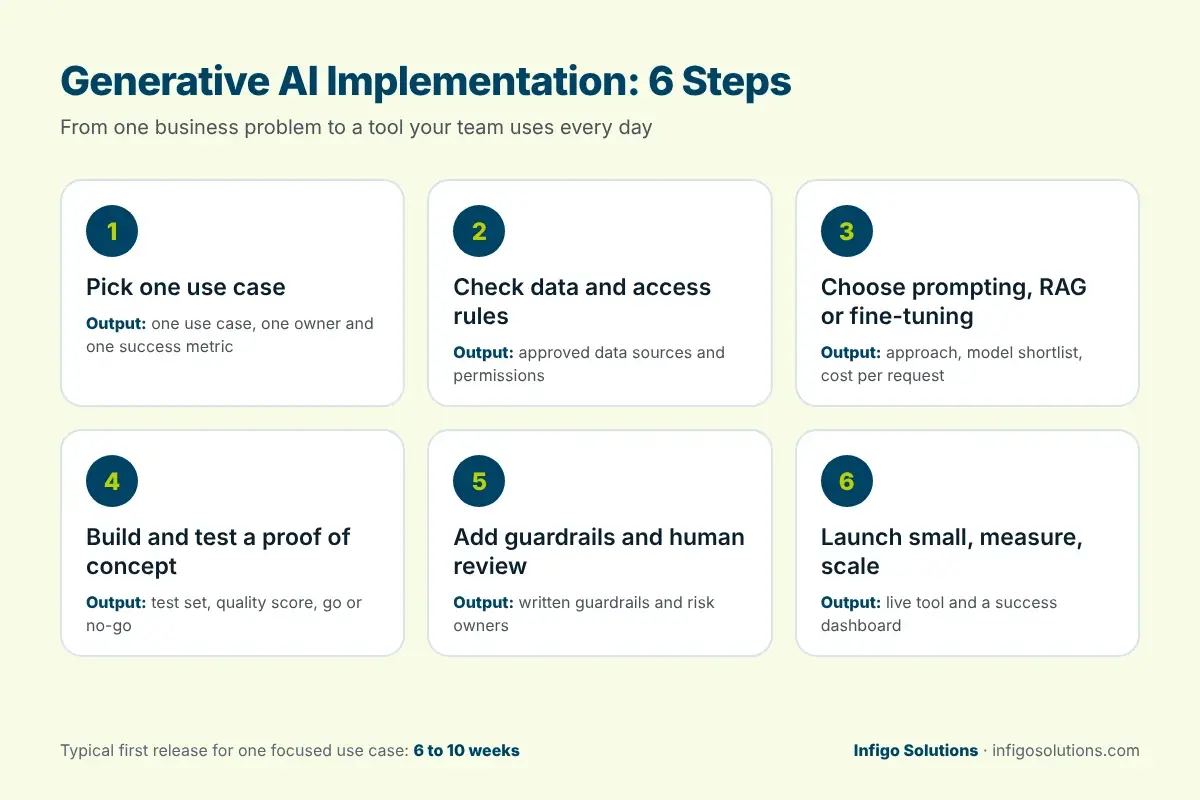
How to Implement Generative AI: 6 Steps
These six generative AI implementation steps work for most business use cases, from internal knowledge assistants to customer support, document processing and sales tools. Each step has a clear output, so you know when it is done.
1. Pick One Use Case With a Measurable Outcome
Every generative AI implementation should start with one problem, not a list of ten. Good first use cases are frequent, text-heavy and easy to check, such as answering internal policy questions, drafting replies to common support tickets or summarizing long documents.
Write down the current baseline before you build anything: how long the task takes today, how often it happens and what a mistake costs. Without a baseline, you cannot prove that your generative AI implementation worked.
Output: one use case, one owner and one success metric.
2. Check Your Data and Access Rules
Generative AI is only as useful as the information it can reach. List the documents, databases and systems the use case needs, then check whether that content is current, complete and allowed to be used. Pay close attention to permissions: an assistant should never show an employee a document they could not open themselves.
Our AI data readiness guide covers this step in detail, including a checklist for unstructured content used in retrieval.
Output: a list of approved data sources and the access rules the system must follow.
3. Choose the Approach: Prompting, RAG or Fine-Tuning
This is where many teams overspend. Most business use cases do not need a custom model. The table below compares the three common approaches.
| Approach | What it is | Best for | Trade-offs |
| Prompting a foundation model | Using an existing LLM through an API with well-designed instructions | Drafting, summarizing and classifying text that needs no private knowledge | Fastest and cheapest to start; cannot use your internal data on its own |
| Retrieval-augmented generation (RAG) | The system first searches your approved documents, then the model answers using what it found | Knowledge assistants, support answers and policy questions | Needs clean, well-organized content and a search layer; answers can cite their sources |
| Fine-tuning | Further training a model on your own examples | A fixed style, format or narrow task done at high volume | Needs good training data, more cost and retraining when things change |
For most first projects, prompting or RAG is the right place to start. Fine-tuning makes sense later, once you know exactly where the simpler approaches fall short. If you are also weighing an off-the-shelf tool against a custom build, read our guide to custom AI development vs off-the-shelf AI.
Output: a chosen approach, a model shortlist and a rough cost per request.

4. Build a Proof of Concept and Test It on Real Cases
In a generative AI implementation, a proof of concept answers one question: can this work on our data, at the quality we need? Build the smallest version that runs on real examples, then test it against a set of 50 to 100 real questions or documents with known correct answers.
Score the results for accuracy, completeness and tone, and record every failure. A proof of concept is not a product, so plan the next step before you start. Our article on AI PoC vs MVP explains when to stop testing and start building.
Output: a test set, a quality score and a clear go or no-go decision.
5. Add Guardrails, Governance and Human Review
Generative AI can produce confident answers that are wrong. Guardrails reduce that risk in any generative AI implementation. Typical guardrails include limiting answers to approved sources, showing citations, blocking sensitive data from leaving your systems, logging every request and sending high-risk outputs to a person for review.
The NIST AI Risk Management Framework, which includes a Generative AI Profile published in 2024, is a practical reference for the risks to cover. For the organizational side, our AI governance maturity model shows how to grow governance as usage grows.
Output: written guardrails, an owner for each risk and a review process for edge cases.
6. Launch to a Small Group, Measure and Scale
Release the tool to a small group of real users first. Track the success metric from step 1, along with usage, error reports and cost per request. Fix what users report, then widen access in stages.
Before a full rollout, check monitoring, fallbacks, cost limits and ownership. Our AI production readiness checklist covers the seven gates to pass before you scale.
Output: a live tool, a dashboard for the success metric and a plan for the next use case.
Generative AI Implementation Timeline
Timelines depend on scope, data quality and how quickly decisions are made. For a single, focused use case, a first release typically takes 6 to 10 weeks. The ranges below show how that time is usually spent.
| Phase | Typical duration | What you get |
| Use case and success metric | 1 week | One use case, owner and baseline |
| Data and access review | 1 to 2 weeks | Approved data sources and access rules |
| Proof of concept and testing | 2 to 3 weeks | Working prototype, test set and quality score |
| Guardrails and integration | 1 to 2 weeks | Connected to your tools, with logging and review |
| Pilot with real users | 1 to 2 weeks | First release, usage data and a scale-up plan |
Larger programs with several use cases, strict compliance needs or many system integrations take longer and are usually delivered in phases.
What Are the Main Challenges in Implementing Generative AI?
The main challenges in implementing generative AI are poor data quality, inaccurate answers, unclear business value, rising costs, security and privacy risks, difficult integration with existing systems and low user adoption. Most can be reduced with good planning in steps 1 to 5.
- Data quality: outdated or duplicated documents lead to wrong answers. Clean the sources before you connect them.
- Inaccurate answers (hallucinations): use RAG with citations, test against real cases and keep a person in the loop for high-risk outputs.
- Unclear value: without a baseline and a single metric, the project becomes a demo nobody owns.
- Cost: usage-based model pricing grows with traffic. Set limits and track cost per request from day one.
- Security and privacy: check where data is processed and stored, and follow your existing access rules.
- Integration: a generative AI implementation must fit inside the systems people already use, or they will not open it.
- Adoption: train users, explain what the tool can and cannot do, and collect feedback in the first weeks.
Benefits of Implementing Generative AI
When a generative AI implementation is scoped well, the benefits are practical rather than dramatic: less time spent searching for information, faster first drafts, more consistent answers to customers and staff, and experienced people freed for work that needs judgment. The honest caveat is that these gains appear in specific tasks, not across the whole company at once, which is why starting with one measurable use case matters.

What Drives Generative AI Implementation Cost?
There is no single price for generative AI implementation, because cost depends on a few clear factors:
- The approach you choose: prompting, RAG or fine-tuning
- How many data sources need to be cleaned and connected
- The number of integrations with existing systems
- Security, compliance and review requirements
- Expected usage, which drives ongoing model costs
For a detailed breakdown of build and running costs, see our guide to AI app development cost.
Should You Implement Generative AI In-House or With a Partner?
Build in-house if you already have engineers with production AI experience and a team that can own the system after launch. Work with a partner if you need to move faster, lack experience with RAG, evaluation and guardrails, or want an outside team to deliver the first release while your team learns.
A good partner should start with your use case and data, not with a model. They should also agree in writing on what you will own at the end of the project. At Infigo Solutions, our enterprise AI solutions team handles generative AI implementation for established businesses, and our AI product development service helps startups build AI into a new product.

Frequently Asked Questions
How long does generative AI implementation take?
A focused generative AI implementation with one use case usually reaches a first release in 6 to 10 weeks. That covers defining the use case, reviewing data, building and testing a proof of concept, adding guardrails and running a pilot. Programs with several use cases, strict compliance needs or many integrations take longer and are delivered in phases.
Do I need to fine-tune a model to implement generative AI?
Usually not. Most business use cases work well with a strong foundation model plus good prompting or retrieval-augmented generation (RAG), which lets the model answer from your own documents. Fine-tuning is worth it when you need a very specific style or format at high volume and simpler approaches have already been tested and fall short.
What is RAG in generative AI implementation?
Retrieval-augmented generation (RAG) is an approach where the system first searches your approved documents or data, then gives the most relevant passages to the language model to write its answer. It keeps answers grounded in your own information, allows citations and is easier to keep current than retraining a model every time your content changes.
How do you measure the success of a generative AI implementation?
Measure it against the baseline you recorded before building. Common metrics are time saved per task, response time, accuracy against a test set, the share of answers that need human correction, user adoption and cost per request. Pick one main metric tied to a business outcome, and track it from the pilot onward.
Is company data safe when implementing generative AI?
It can be, if security is planned from the start. Check where each provider processes and stores data, whether inputs are used for training, and which data is allowed to leave your systems. Then enforce your existing access rules, log every request and keep sensitive or high-risk outputs under human review.
Start With One Use Case
A successful generative AI implementation starts small: one use case, one metric, clean data and the simplest approach that works. Get that right, and the second and third use cases become much faster. If you want help planning or building your first generative AI project, talk to our team. We reply within 24 hours.


.webp "LinkedIn")
Leave a Message

Max
Senior Consultant
Helps enterprises evaluate custom software partners, plan legacy modernization, and budget realistically for large-scale systems.
Recent Posts
November 2, 2026 October 27, 2026
Cloud Migration Steps: A 7-Step Plan for a Safe Move
 October 26, 2026

Comments
No comments yet. Be the first to comment!