 October 27, 2026
Cloud Migration Steps: A 7-Step Plan for a Safe Move

27
Oct
2026
 Max
 Technology
 0 Comments
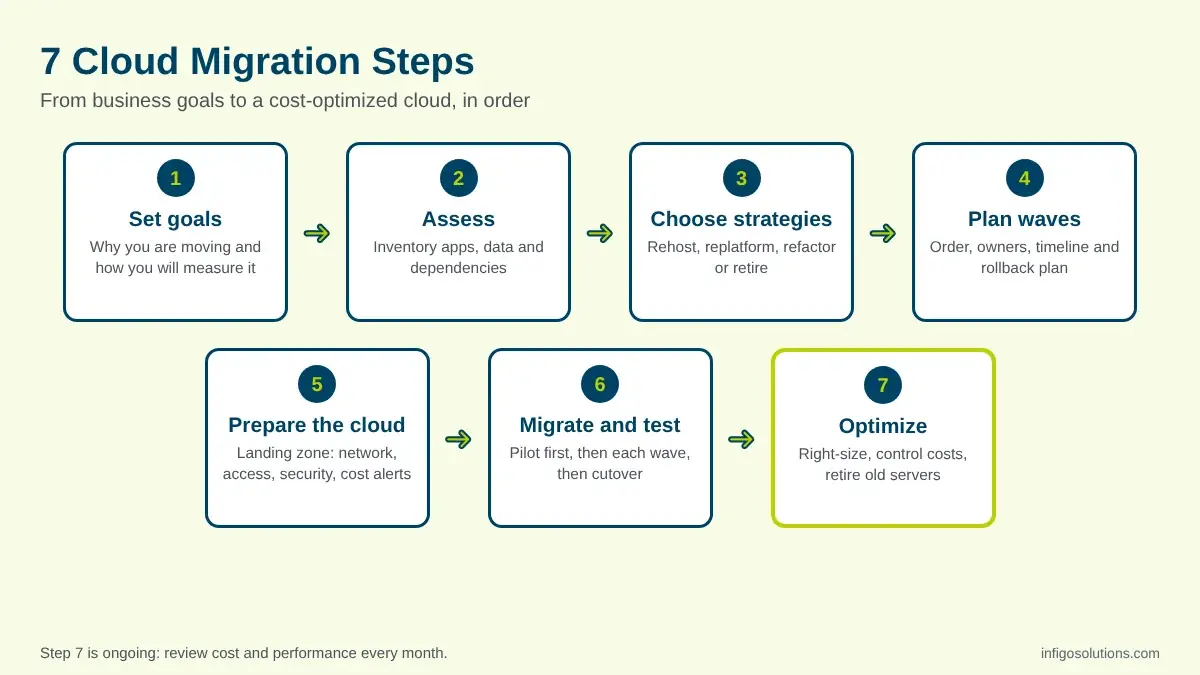
The main cloud migration steps are: set clear business goals, assess your applications and data, choose a migration strategy for each application, plan the migration in waves, prepare a secure cloud environment, migrate and test, starting with a pilot, and then optimize cost and performance. Skipping the first two steps causes most migration problems.
Moving to the cloud is not one big switch. It is a sequence of smaller decisions, and the order matters. Teams that jump straight to moving servers often end up with higher bills, broken integrations or a weekend of unexpected downtime. This guide walks through the seven cloud migration steps we recommend, what each step produces, and the mistakes to avoid along the way.
What Is a Cloud Migration Process?
A cloud migration process is the planned sequence of work used to move applications, data and infrastructure from your own servers, or from another cloud, to a cloud platform such as AWS, Microsoft Azure or Google Cloud. A good process covers the business case, the technical move and the work that happens after go-live.
The major cloud providers all describe the process in phases. AWS Prescriptive Guidance uses three phases: assess, mobilize and migrate. Google Cloud uses four: assess, plan, deploy and optimize. Microsoft's Cloud Adoption Framework lists five: plan migration, prepare workloads, execute migration, optimize in cloud and decommission the source. The names differ, but the logic is the same. The steps for cloud migration below follow that logic, split into seven cloud migration steps that are easier to assign to owners.
The 7 Cloud Migration Steps at a Glance
The table below summarizes the cloud migration steps, what you do in each one and what you should have when the step is done.
| Step | What you do | What you have at the end |
| 1. Set goals | Agree why you are moving and how you will measure success | Written goals and success metrics |
| 2. Assess | List every application, its data and its dependencies | An inventory and dependency map |
| 3. Choose strategies | Decide how each application will move | A strategy for every application |
| 4. Plan | Group applications into waves, set timelines and owners | A migration plan with a rollback plan |
| 5. Prepare the cloud | Set up accounts, network, identity, security and monitoring | A ready, secure landing zone |
| 6. Migrate and test | Move a pilot first, then each wave, and test before cutover | Applications running in the cloud |
| 7. Optimize | Right-size resources, control costs, retire old systems | Lower cost and better performance |
The Cloud Migration Steps, Explained
Each of the cloud migration steps below builds on the one before it. You can run some work in parallel, but skipping a step usually means coming back to it later at a higher cost.
Step 1: Set business goals and success metrics
The first of the cloud migration steps is about why, not how. Are you moving to cut hardware costs, release faster, improve disaster recovery or leave a data center before a contract ends? Each goal leads to different choices later. Write down two or three goals and how you will measure them, for example monthly infrastructure cost, deployment frequency or recovery time after an outage. If you are still deciding whether the move is worth it, our guide to the benefits of cloud migration covers the pros, cons and when it pays off.
Step 2: Assess your applications, data and dependencies
This is the step teams most often rush, and it is the one that decides how smoothly the rest of the cloud migration steps go. Build an inventory of every application, database, file store and integration. For each one, record who owns it, how critical it is, how much data it holds and what it depends on. Dependency mapping matters most: an app that looks simple may call a reporting database, a payment service and a file share that all need to move with it, or at least stay reachable.
Step 3: Choose a migration strategy for each application
Not every application should move the same way, and this is one of the cloud migration steps where a single wrong choice can double the cost. Cloud providers describe several strategies, often called the 7 Rs. The four you will use most are:
| Strategy | What it means | Use it when |
| Rehost (lift and shift) | Move the application as it is | You need to move fast, for example before a data center contract ends |
| Replatform | Make small changes, such as moving to a managed database | You want quick wins without rewriting code |
| Refactor | Redesign the application to use cloud services fully | The app limits growth or costs too much to run as it is |
| Retire or repurchase | Switch the system off, or replace it with a SaaS product | Nobody needs it, or a ready-made product does the job better |
How an application is built affects which strategy makes sense. Our guide to web application architecture explains layers, scaling and services, which helps when you are deciding whether to rehost or refactor.
Step 4: Plan the migration in waves
Planning turns the earlier cloud migration steps into a schedule. Group applications into waves based on their dependencies and risk. Applications that depend on each other usually move together. For each wave, set a timeline, an owner, a testing plan, a communication plan for users and, most importantly, a rollback plan. Decide in advance what "done" looks like and what would make you roll back. Agree on a budget for the move itself, including a period where you pay for both the old and the new environment.
Step 5: Prepare the cloud environment
Of all the cloud migration steps, this is where security is easiest to get right. Before anything moves, build the foundation, often called a landing zone. This includes cloud accounts or subscriptions, networking, identity and access management, encryption, logging and monitoring. Set up cost controls now as well: budgets, alerts and resource tagging. Use least-privilege access and multi-factor authentication from day one, because security settings are much harder to fix after applications are already running.
Step 6: Migrate, test and cut over, starting with a pilot
This is the most visible of the cloud migration steps, so it gets the most attention, but it only goes well when the earlier steps are done. Start with a pilot: an application that matters but is not business critical. Use it to test your tools, your process and your team. Then move each wave in turn. For every application, migrate the data, test functionality, performance and security, and only then switch users over. Plan the cutover for a low-traffic window, keep the old system available until the new one is stable, and confirm that backups and restores work in the new environment.
Step 7: Optimize cost, performance and security
Migration does not end at go-live. In the first weeks, review usage and right-size resources that are larger than they need to be. Turn on auto-scaling where traffic varies, switch off idle environments and review the bill monthly. Once everything is stable, decommission the old servers so you stop paying twice. This last of the cloud migration steps is also where the long-term value appears, because it is when teams start using managed services and modernize parts of the system. Our article on enterprise application modernization explains how that next phase usually works.

Application Migration to Cloud: Steps for a Single App
Sometimes you only need to move one application. In that case the cloud migration steps shrink into a shorter checklist:
- Confirm the goal and the owner of the application.
- Map its dependencies: databases, file storage, APIs and third-party services.
- Choose rehost, replatform or refactor.
- Set up the target environment with access, networking and monitoring.
- Copy the data and keep it in sync until cutover.
- Test functionality, performance and security in the cloud.
- Cut over in a low-traffic window, with a rollback plan ready.
- Monitor closely for two weeks, then retire the old setup.
After that, the optimization work from the full list of cloud migration steps applies to this application too.

Cloud Migration Checklist Before You Start
Use this short checklist to confirm you are ready to begin. If any line is not true yet, go back to the matching step before you move a single server, because every one of the cloud migration steps depends on it:
- Goals and success metrics are written down and agreed.
- Every application has an owner and a place in the inventory.
- Dependencies are mapped, including integrations with outside services.
- Each application has a chosen strategy.
- A rollback plan exists for every wave.
- Budgets, alerts and tagging are set up before the first move.
- Backups have been tested, not only scheduled.
- Users know when changes will happen and who to contact.
Common Mistakes to Avoid
These are the mistakes that most often turn well-planned cloud migration steps into a costly project:
- Skipping the assessment. Hidden dependencies are the most common cause of broken features after a move.
- Moving everything at once. A big-bang migration raises risk. Waves let you learn and adjust.
- Treating lift and shift as the finish line. It is the fastest way in, but it delivers the fewest cloud benefits until you optimize.
- Adding security later. Access rules and encryption are easier to set before applications go live.
- No one owns the cloud bill. Without budgets and a monthly review, costs grow quietly.
- Switching off the old system too early. Keep it until the new environment has proven stable.
For older systems that need deeper changes before they can move, our legacy system modernization service is often the right first step. If you are also weighing where core business systems should run, our comparison of cloud vs on-premises ERP walks through that decision.

Frequently Asked Questions
What are the 7 steps of cloud migration?
The 7 steps of cloud migration are: set business goals, assess applications and dependencies, choose a strategy for each application, plan in waves, prepare a secure cloud environment, migrate and test starting with a pilot, and optimize after go-live. AWS, Microsoft and Google group the same work into three to five phases.
What is the most important step in cloud migration?
Assessment is usually the most important of the cloud migration steps. An accurate inventory of applications, data and dependencies prevents broken integrations, surprise costs and failed cutovers later. Teams that rush assessment often discover hidden dependencies only after users report problems, which is the most expensive time to find them. Clear goals, set just before assessment, are a close second.
What should a cloud migration plan include?
A cloud migration plan should include your goals and success metrics, an inventory of applications and dependencies, the strategy chosen for each application, the order of migration waves, owners and timelines, a testing plan, a rollback plan and a budget. The cloud migration steps in this guide map directly onto those sections.
What is the difference between rehost and refactor?
Rehosting, or lift and shift, moves an application to the cloud without changing its code. It is fast but delivers fewer cloud benefits. Refactoring redesigns the application to use cloud services such as managed databases, containers and auto-scaling. It takes longer and costs more upfront, but usually gives better scalability and lower running costs over time.
Can you migrate to the cloud without downtime?
Often you can keep downtime very short, but zero downtime is not guaranteed for every system. Techniques such as continuous data replication, running old and new systems side by side, and cutting over in a low-traffic window reduce the impact. A tested rollback plan is essential, so you can switch back quickly if something fails.
Final Thoughts
The cloud migration steps are simple to list and harder to follow with discipline. Set goals, assess honestly, choose the right strategy for each application, plan in waves, build a secure foundation, migrate with a pilot first and keep optimizing after go-live. Most failed migrations skip one of these steps, usually assessment or optimization.
If you want a team to plan and run the move with you, from assessment to cost control after go-live, our cloud migration and DevOps services cover each of these cloud migration steps.


.webp "LinkedIn")
Leave a Message

Max
Senior Consultant
Helps enterprises evaluate custom software partners, plan legacy modernization, and budget realistically for large-scale systems.
Recent Posts
October 27, 2026 October 26, 2026
Benefits of Cloud Migration: Pros, Cons and When It Pays Off
 October 26, 2026

Comments
No comments yet. Be the first to comment!